





Secure checkout · Instant delivery to your email


For any small business
30 carousels for your business. The blanks tell you what to write.
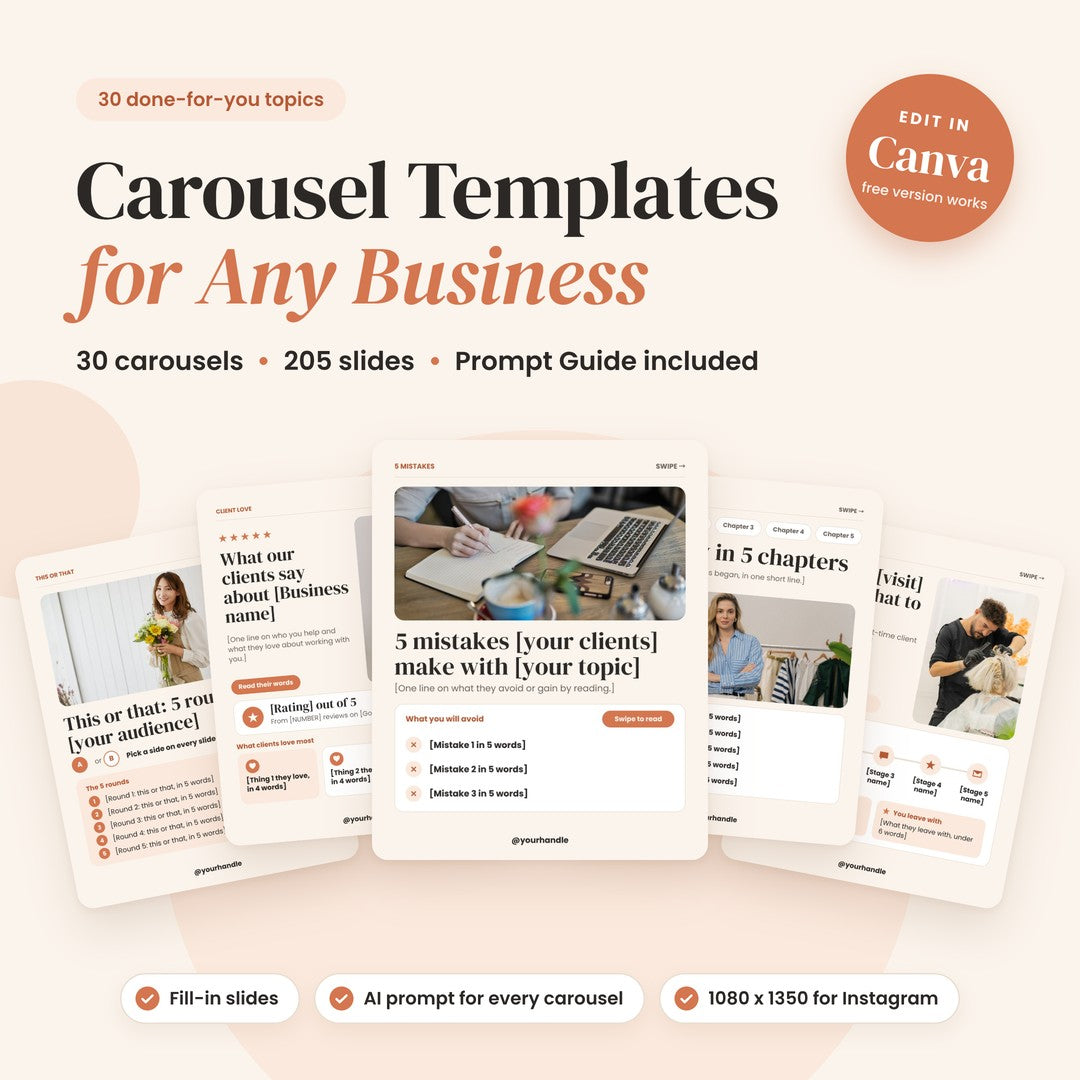
205 editable Canva slides across 30 topics every small business posts about, from mistakes and myths to client stories and offers. Each slide has a real structure of fill-in fields, not just a headline. Every box says what to write, and the included Prompt Guide gives you an AI prompt for each carousel. Fill in the blanks, add your handle, post.
- ✓ Editable with the free version of Canva
- ✓ 30 AI prompts included
- ✓ Instagram, Facebook & LinkedIn
- ✓ Personal Use or Resell Rights

Carousels30done-for-you topics
Slides205fill-in, fully editable
AI prompts30one for every carousel
Format4:51080 × 1350 px portrait
Swipe through
Every carousel is a full post,
cover to call to action.
A cover with a hook, content slides that build in one layout, and a last slide that tells people what to do next. Shown exactly as you get them, placeholders and all.
#01 Mistakes and fixes
5 Mistakes Your Clients Make
Each mistake comes with why it hurts, what to do instead and how to spot it, then a recap slide and a call to action.

Swipe →
#08 Client story
Client Story: From Before to After
Meet the client, where they started, the plan and the result, with [NUMBER] placeholders for your real figures.

Swipe →
#25 Client journey
Your First Visit: What to Expect
A five-stage timeline that walks a new client through their first visit: what happens, what they do, what you take care of and a tip at every stage.

Swipe →
What you get
One Canva template, plus the prompts.
One link copies all 30 carousels into your Canva account. The Prompt Guide gives you the words to go with them.
Carousels30 done-for-you topics that fit any small business, from mistakes and myths to client stories and launches.
Slides205 editable slides, 5 to 9 per carousel: a cover with a hook, content slides with several fill-in fields each, and a call-to-action slide.
Pages235 pages in one Canva template. Each carousel starts with a divider page (“Carousel N” and its topic) to help you find it. Dividers are not for posting.
Prompt Guide30 AI prompts, one per carousel, for ChatGPT, Claude or Gemini. A page on how to use them, an index, then one prompt per page.
Size1080 × 1350 px (4:5 portrait) for Instagram and Facebook carousels. Download as a PDF for LinkedIn document carousels.
DesignCream pages, white cards and terracotta accents, with rounded photos. Layouts fill the whole slide, and every carousel has its own.
CanvaOnly photos, elements and fonts that come with the free version of Canva. Fonts: DM Serif Display and Poppins.
PlaceholdersEvery fill-in box says what to write, like [Name the mistake in under 7 words]. The lines you write carry a word limit.
BrandingNo logo or website bars. Swap the small label at the top of a slide for your logo. Only a small @yourhandle sits at the bottom.
DeliveryInstant digital download: a PDF with your Canva template link and the Prompt Guide. Nothing is shipped.
LanguageUS English. Every word is editable.
Fill-in slides
Every box tells you
what to write.
No lorem ipsum. Each slide carries more than a headline: a real structure of fill-in fields, and each box tells you what goes there, so your words fit the design.

What to writeEvery line has a job[Name the mistake in under 7 words] tells you exactly what the line is for, so you never stare at an empty box.
How longWord limits that fitThe lines you write carry a word limit, like under 18 words, so your text stays inside its box.
Your detailsPlaceholders, not promises[Client name], [NUMBER], [PRICE] and [yourwebsite.com] mark what only you can fill in. No results or reviews are invented.
More than a headline: every slide is built from fields that each do a job. Depending on the carousel, you will fill in fields like these.
- Why it hurts
- Do this instead
- How to spot it
- Why it helps
- Try this
- Real example
- What to do about it
- Good sign
- Red flag
- What happens next
Prompt Guide included
Not sure what to say?
There’s a prompt for that.
Every carousel has a matching AI prompt. Add your business details, paste it into ChatGPT, Claude or Gemini, and you get the copy for every slide at the right length.

1PromptFill in your detailsOpen the prompt for your carousel and replace the parts in [brackets] with your business, your ideal client and your offer.
2CopyRun it in your AI toolPaste it into ChatGPT, Claude or Gemini. You get copy labeled slide by slide, at the word counts the design needs.
3PasteDrop it into the slidesPaste each line into its placeholder, swap the photos for your own and add your handle.
Good to know: the prompts ask for real details only, with no made-up numbers, reviews or results. Where a slide needs a figure or a review, you add your own.
30 carousels, 30 layouts
Not 30 versions of the same post.
Every carousel has its own layout, so your feed stays varied while your colors and fonts stay the same.
 Myth vs factMyths, correctedThe myth, where it comes from, the fact, why it matters and what to do instead.
 ProcessHow you workA four-step roadmap with what you do, what the client does and what they get.
 ReviewsRoom for real reviewsStars, [Client name] and their own words, plus Before we met and What changed.
 EngagementComment A or BTwo photo options per round, a Best for line on each and your own pick.
 ChecklistLists that tick offTwo checks per slide, each with how to check it, a good sign and what to watch out for.
 ExplainerYour industry in plain wordsA term in plain words, a real example, when you will hear it and what not to mix it up with.
 ServicesWays to work with you[Package name], [PRICE], what’s included, what they walk away with and what to know.
 FactsFacts with a [NUMBER]One big number, what it means, what to do about it, a real example and its source.
Plus your brand story in chapters, a day at your business, before-and-after client stories, a launch announcement, seasonal tips, your values, favorite products, lessons from your years in business and a guide giveaway.
All 30 topics
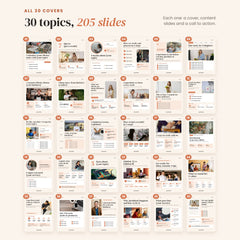
30 topics, ready for your words.
These are the covers, the first slide of each carousel. In Canva, every carousel comes right after its numbered divider page.

- 5 Mistakes Your Clients MakeMistakes and fixes · 8 slides
- 7 Tips to Get a ResultTips · 9 slides
- 4 Myths About Your TopicMyth vs fact · 6 slides
- How We Work: Our Process in 4 StepsProcess · 6 slides
- 6 Questions to Ask Before You BuyBuyer guide · 8 slides
- Our Story in 5 ChaptersBrand story · 7 slides
- 3 Reasons Clients Choose Your BusinessWhy choose us · 5 slides
- Client Story: From Before to AfterProof · 7 slides
- What Our Clients SayReviews · 7 slides
- 6 Questions We Hear Every WeekFAQ · 8 slides
- This or That: 5 RoundsEngagement · 7 slides
- Checklist: 8 Things to CheckChecklist · 7 slides
- Do This, Not That: 5 SwapsSwaps · 7 slides
- A Day at Your BusinessBehind the scenes · 7 slides
- 6 Industry Terms, ExplainedExplainer · 8 slides
- How to Get a Result in 5 StepsHow-to · 7 slides
- 3 Ways to Work With UsServices · 5 slides
- Introducing Your New OfferLaunch · 6 slides
- 6 Signs You Need Your ServiceLead generation · 8 slides
- 4 Quick Wins You Can Do TodayQuick wins · 6 slides
- 5 Facts About Your TopicFacts · 7 slides
- Option A vs Option BComparison · 7 slides
- Get Ready for Your Busy SeasonSeasonal · 6 slides
- What We Stand For: 4 ValuesValues · 6 slides
- Your First Visit: What to ExpectClient journey · 7 slides
- Our 5 Favorite Tools or ProductsRecommendations · 7 slides
- 6 Lessons From Years in BusinessLessons · 8 slides
- Why a Problem Happens and How to Fix ItProblem and fix · 6 slides
- What Goes Into Your ServiceBehind the price · 6 slides
- Get Our Guide: What’s InsideLead magnet · 6 slides
Works for any business
Built on the posts every business needs.
Mistakes, myths, tips, client stories, questions and offers work for a salon as well as a bookkeeper. The placeholders and prompts turn each topic into posts about your work, in your words.
One carousel, five businesses5 mistakes [your clients] make with [your topic]
Bookkeeper5 mistakes small business owners make with their books
Salon5 mistakes clients make with at-home hair color
Cafe5 mistakes coffee lovers make with home brewing
Coach5 mistakes beginners make with strength training
Florist5 mistakes people make with fresh flowers
- Coaches
- Salons
- Cafes
- Consultants
- Shops
- Bookkeepers
- Florists
- And more
Your brand, not ours
Clean slides, ready for your logo.
No logo bars, no website strips, no busy footers. Swap the small label at the top of a slide for your own logo. Only a small @yourhandle sits at the bottom.

Photos you can swapRounded photos from Canva’s library. Replace any of them with photos of your work, your team or your space.
Made for the free version of CanvaOnly photos, elements and fonts that come with the free version of Canva, so nothing on a slide is locked.
How it works
From download to your first carousel in five steps.

Swipe →
1
Download the PDF
Right after checkout you get the PDF with your Canva template link and the Prompt Guide.
2
Use the template
Click the link, sign in to Canva (the free version works) and click “Use template for new design”. All 235 pages are copied to your account.
3
Run the prompt
Copy the prompt for your carousel, fill in your business details and paste it into ChatGPT, Claude or Gemini.
4
Paste and brand
Paste each line into its placeholder, swap the photos, put your logo in place of the small top label and switch the colors if you like.
5
Download and post
Download a carousel’s slides as PNG or JPG for Instagram and Facebook, or as a PDF for LinkedIn. Leave out the divider page.
Choose your license
Two ways to use it.
Option 1
Personal Use
Post the carousels for your own business, and use them to create content for your clients’ social media. Making carousels for a client’s brand? That’s one license per client.
1
Option 2
Resell Rights
Rebrand the templates and sell them as your own digital product, and keep 100% of the profit.
2
Full terms are on our License information page.
Ready when you are
Your next carousel is already planned.
Download the PDF, pick a topic, run its prompt and post your first carousel this week.
✓ 30 topics ✓ 205 fill-in slides ✓ 30 AI prompts ✓ Editable with the free version of Canva ✓ Personal Use or Resell Rights
Instant download
Lifetime access
Fully editable on Canva
Free future updates
How Does It Work?

- Choosing a selection results in a full page refresh.